
Invoicing that actually gets paid
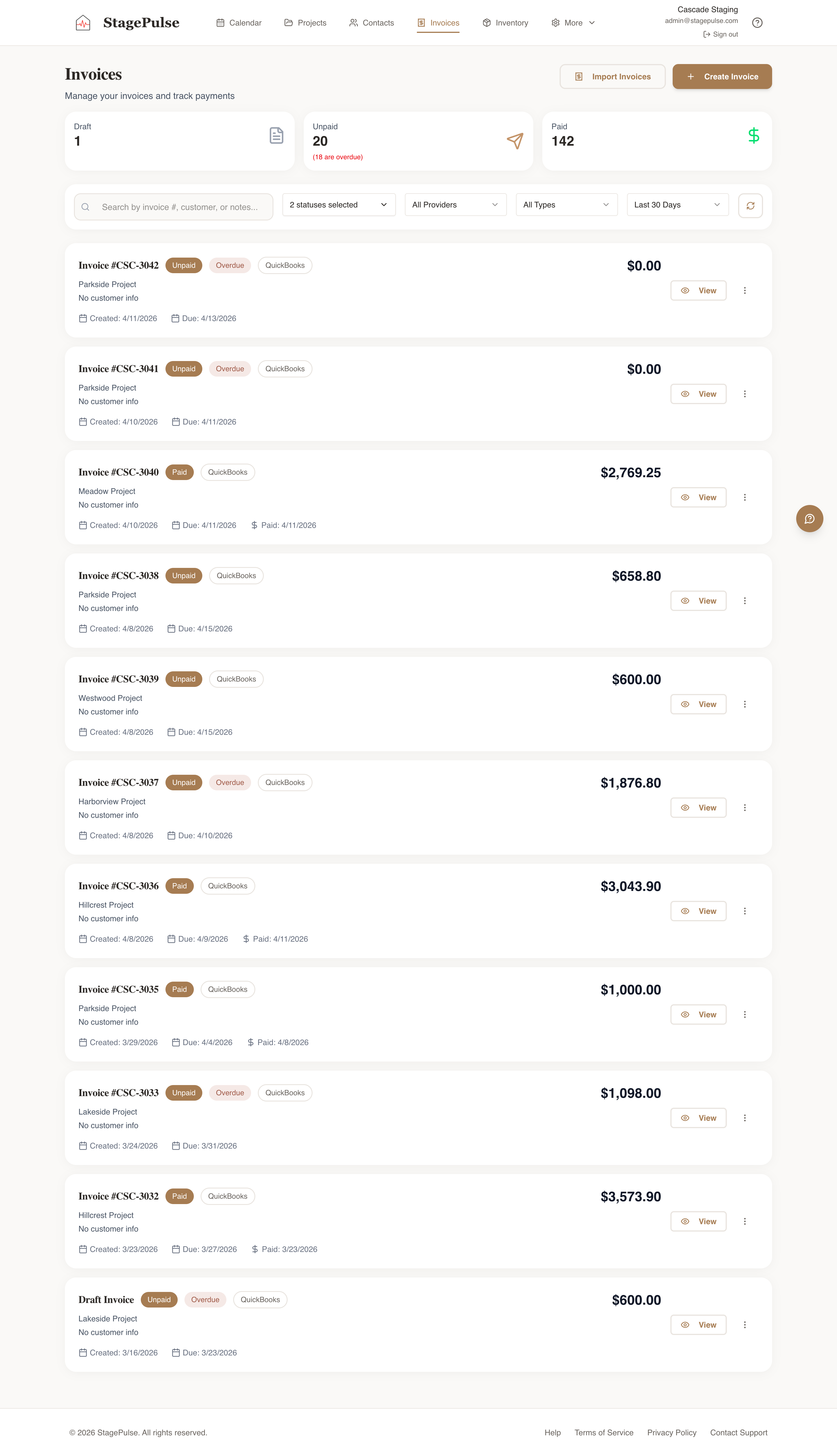
Send through QuickBooks or Stripe, accept payment online, and watch status sync back automatically.
Staging invoices are easy to send and hard to chase. StagePulse handles both ends — it generates the invoice from the work you already logged, sends it through the provider you already use, and tracks whether it's been paid.
Use the tools you already have
- QuickBooks Online — full two-way sync. Invoices you send from StagePulse show up in QuickBooks; payments recorded in QuickBooks sync back here. Your books stay the source of truth.
- Stripe — Stripe-hosted invoices with card payment built in. Great if you're not on QuickBooks or want clients to pay online instantly.
Connect one or both. If you have both, you pick which to send each invoice through, and StagePulse remembers your default.
From project to paid
Your invoice is built from the services on the project — no re-typing line items, no switching apps. Send it, and the project record shows you exactly where it stands: draft, sent, overdue, or paid. Overdue invoices are easy to spot and easy to nudge.
Less admin, fewer errors
Because the invoice draws from the project and syncs with your accounting, the numbers match everywhere. No double entry, no "wait, did this one get paid?", no surprises at tax time.